
Run Your Pipelines in Azure Container Instance
Background
- Microsoft-hosted Azure Pipeline agent run in the public space; therefore, they can only deploy to environments that are publicly accessible.
- Some organizations may need to deploy to target environments that are only accessible within private space (e.g., inside a Azure Virtual Network).
- When the target environment is not publicly accessible, deploying self-hosted pipelines agents are a common solution.
- Organizations can self-host Azure Pipeline agents on Linux, macOS, or Windows (physical or virtual machines) or Azure Virtual Machine Scale Sets; however, this may introduce unwanted overhead in having to patch and maintain these machines.
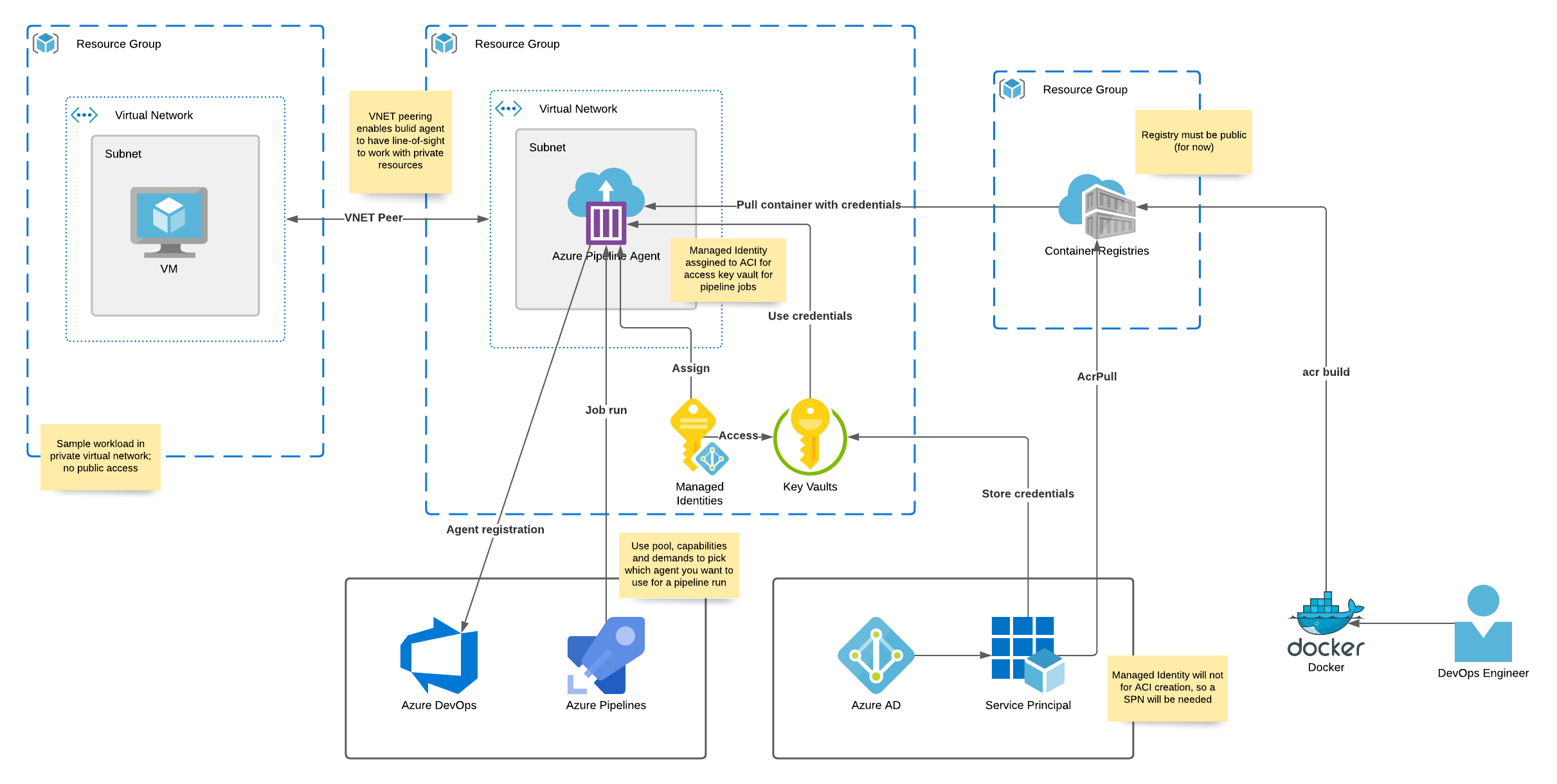
- The alternative is to run an agent in a Docker container and host it in Azure Container Instance which can run inside of the organization’s virtual network and we’ll explore this option for the rest of this guide.
Architecture
Validating Azure AD B2C Tokens
I recently ran into an issue where I needed to help a customer validate an Azure AD B2C JWT access token. We tend to take JWT tokens for granted and sometimes forget that they should be validated by the application. I thought this was going to be pretty straight-forward to solve since Azure AD B2C is effectively Azure AD under the hood. I was wrong.
I initially thought browsing to the OIDC metadata endpoint would reveal the info I needed to validate the signature of the JWT but finding the endpoint was my first challenge.
Continue readingGetting Started With Terraform on Azure
Check out the official Get Started - Azure tutorial here
Terraform basics
Download and Install
Download terraform from https://www.terraform.io/downloads.html
Extract the executable and add the folder to your PATH variable
Open a shell and type
terraform versionThe basic commands we’ll use are:
terraform initterraform planterraform applyterraform destroy
I advise you to use the
terraform fmtcommand often to ensure your scripts well formatted according to HashiCorp’s style conventions
Folder structure
Terrafrom executes on the files within a folder that are named with the .tf extension. Here is what a typical folder structure looks like: